Database- optimization [class 4]
Database Optimisation
optimisation is all about tradeoffs. If you are gaining something, you are losing something.
Performance Depends on
Amount of data
CPU/processor
Storage
RAM/memory
Disk - HDD/SDD
Network Mumbai -8gb California -8gb 1.latency 2.bandwidth - 2GB 1Mbps, 100Mbps
RAM > SSD > HDD [Ram is atleast 20 -25X faster than SSD] cost/money
(for the same size RAM is expensive than SSD and SSD is expensive then HDD)
Query - Basically While Querying the order of stages matters like the below example
The way we write the query affects the performance?
Yes
Lets say, we have users collection. we have to find all the users in the ascending order of their age, whose age is less than 20 and who city is mumbai .
users collection have 5000 data people are present from all cities, all age
  //  Find all the users in the ascending order of age, whose age is less than 20 and whose city is Mumbai.

     //1st way of writing
    // not so optimised query

      db.users.aggregate([
      {$sort: {age:1}},  // age in ascending order // Best TC sorting is NlogN means you have to go through the data atleast once
      {$match:{age:{$lt:20}}},
      {$match: {city:"Mumbai"}}
      ])

     // 2nd way  [the more optimised api]
    // optimised query
      db.user.aggregate([
        {$match:{city:"Mumbai"}},
        {$match:{age:{$lt:20}}},
        {sort:{age:1}}
      ])
In both queries, we're trying to achieve the same result: finding users in Mumbai with an age less than 20, sorted by age in ascending order. Let's break down the differences between the two queries to understand why the second one is more optimized:
First Query:
Sorting First: Initially, the query sorts all users by age in ascending order. This operation, known as
$sort, means MongoDB needs to go through all 5000 user records and sort them based on their age. The sorting operation's time complexity is typically (O(n \log n)), where (n) is the number of documents in the collection.Filtering by Age and City: After sorting, it filters out users with an age less than 20 using
$match. Then, it further narrows down the results to only those who live in Mumbai by another$matchstage.
Second Query:
Filtering First: This query starts by filtering users who live in Mumbai using
$match. It immediately reduces the dataset to only users from Mumbai, which is a more efficient approach because it decreases the number of documents MongoDB needs to process further.Further Filtering and Sorting: After filtering by city, it applies another
$matchstage to filter out users with an age less than 20. Then, it sorts the filtered results by age in ascending order using$sort.
Why the Second Query is More Optimized:
Reduced Dataset Size: By filtering users by city first, the second query avoids sorting unnecessary documents that are not from Mumbai. This means fewer documents need to be processed for subsequent operations, leading to better performance.
Early Filtering: Filtering by city early in the pipeline allows subsequent operations to work with a smaller dataset. This approach minimizes the computational overhead of sorting and matching operations.
Efficient Ordering: Since the filtering is done first, the sorting operation only needs to sort the subset of users from Mumbai, which is smaller compared to sorting the entire collection in the first query.
In summary, the second query optimizes performance by efficiently reducing the dataset size early in the pipeline through effective filtering, leading to faster execution compared to the first query, especially when dealing with large datasets.
Basically While Querying the order of stages matters
Sharding
entire DB splits into small DB's
Scaling a system
there are 2 ways to scale a system
Horizontal Scaling
Vertical Scaling
[16 GB + 16 GB ]
Query Optimisation
Indexing in MongoDb
_id in mongodb is indexed by default
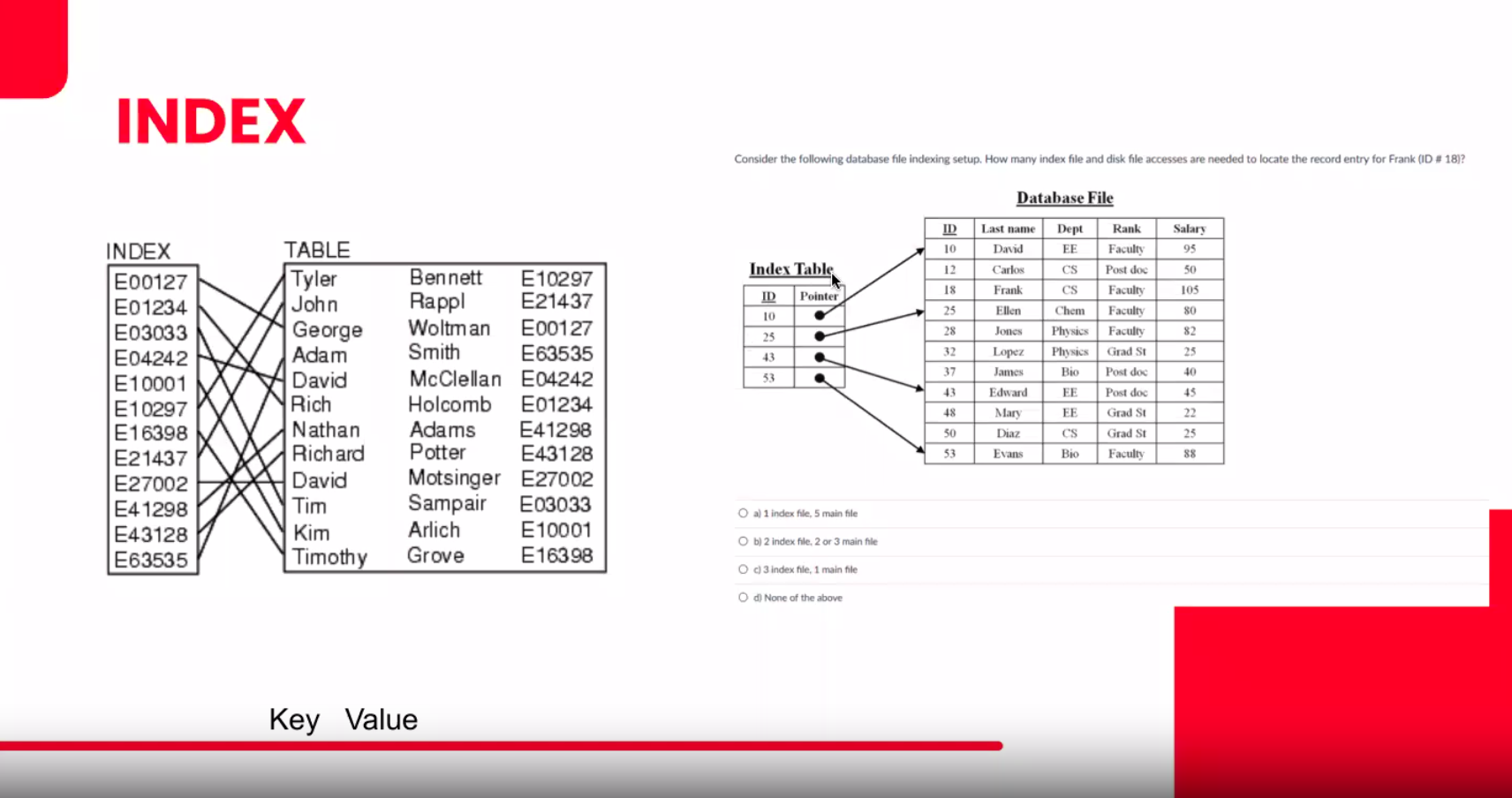
COLLSCAN -> meaning collection scan we can see the data of collscan in mongodb
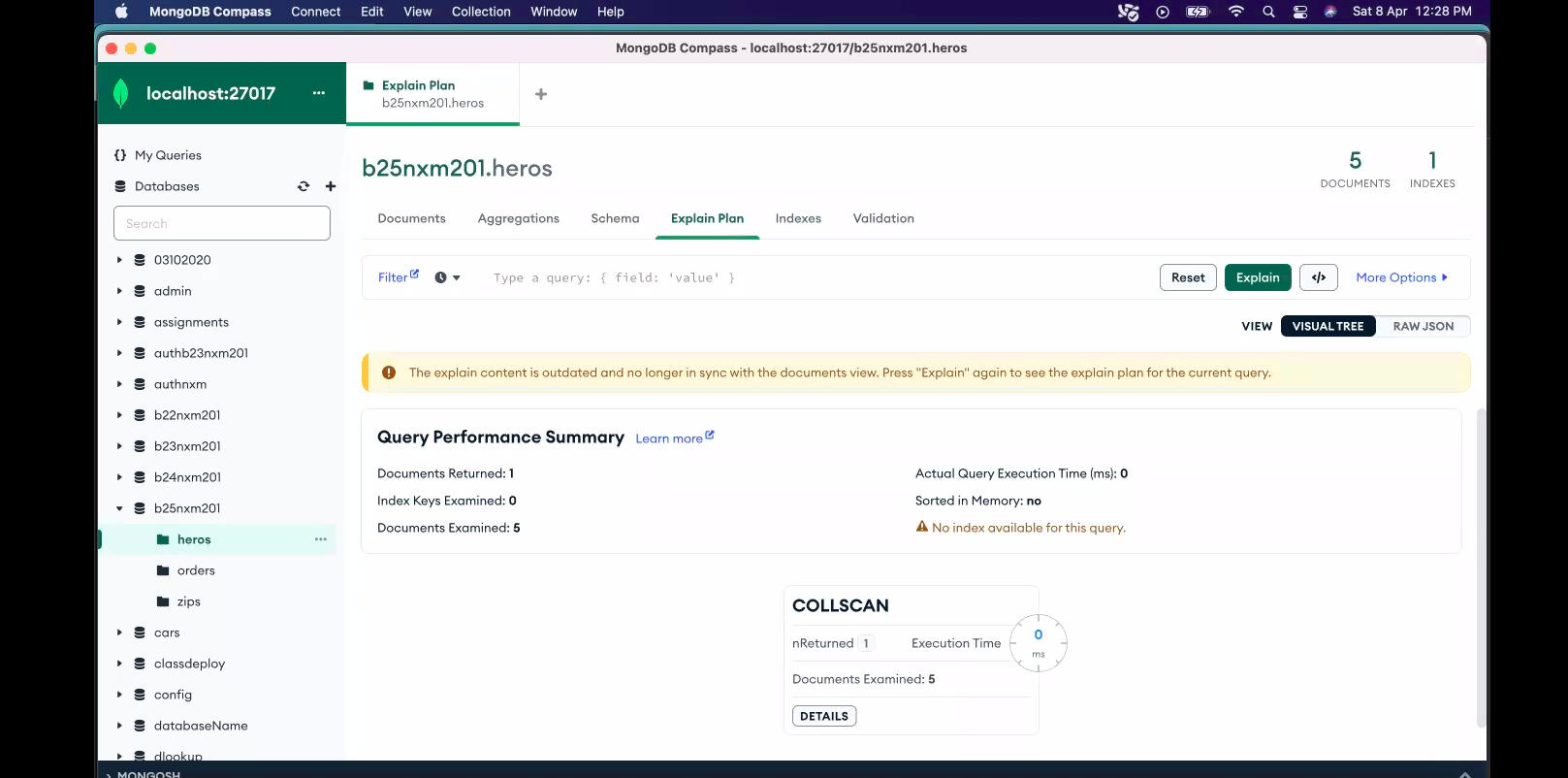
IXSCAN -> index scan.
after indexing index scan hapened
resulted in fast query
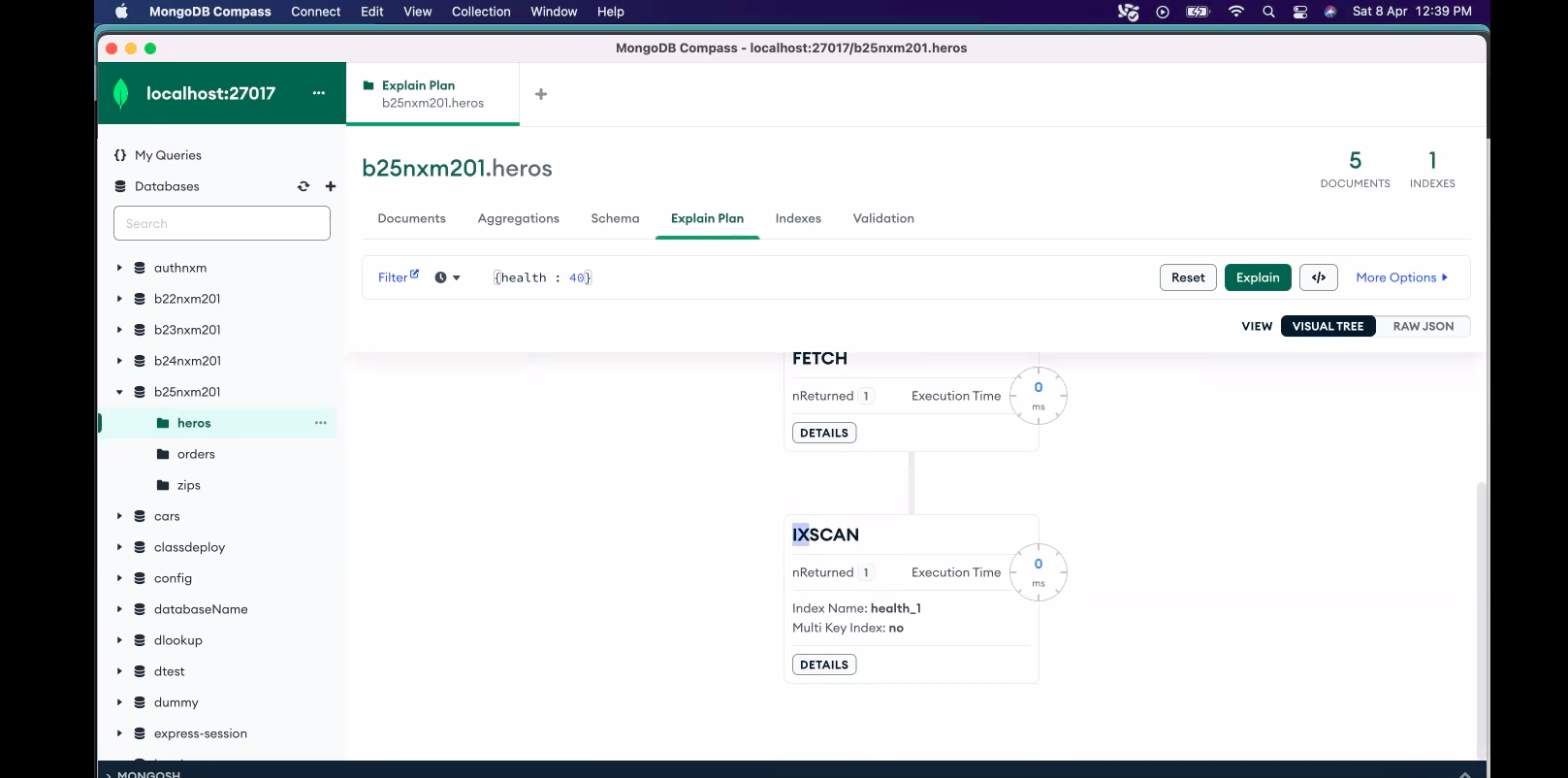
Indexing -> makes query super fast -> O(n) to O(1)
- Should we index all the keys? -> No
answer is do we index all the words in a book
- whick keys should we index?
most used keys should be indexed to make the read queries much faster
Questions to look after this class
Benefits of Sharding?
How requests move in case of sharded dbs, lets suppose I have sharded db's of college students. for the first set of students we have 10 million students. and that students got passed out after 3 years. all the data for those students are handled in DB1.
second set of students came after 3 years there data is getting stored in DB2.
How the express server will distribute the load to DB1 and DB2? How they will identify this requets should go to DB1 or DB2
Advantages of Indexing
- Read Query Becomes Faster by Indexing.
Disadvantages of Indexing
Takes Extra Space
Write/Create/Insert query will be slower
whenever we add a new document, indexing is not stored in a plain table. It uses something
B+ treesevery time you create a new index, this tree needs to be balanced which again requires a bit of more processing.
If there is no indexing there is no tree as such.
Explaination of Write/Create/Insert query will be slower
write query will become slower. because after writing the data it has to index also.
So Question to Research How to do indexing to have minimal effect in write query ?
users1- health - indexed
health: 57
users2 - no index
if we are creating indexing, then there is some disadvantages also.
one disadvantage is that
1. it will take an extra space ( why it will take extra space -> to maintain that extra index table)
2. write (or create or insert ) query will become slower. (why it will be slower ?
read the below example )
Why Create Query Becomes Slower?
Think of a Book Example.
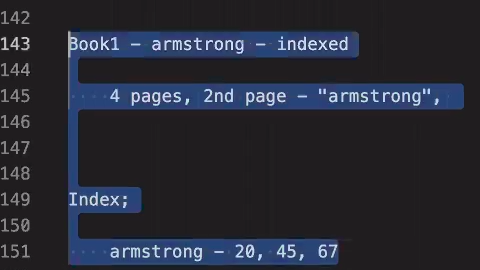
Suppose In Book1 -> armstrong word is indexed (Book 1 is not published yet)
Now You want to add 4 pages
in any one page the word armstrong is present
so you will just add the page or do you have to modify something, You have to go and change the index.
In the Index Page where Armstrong is present , lets suppose its present in page number 20 and 45, now you added a new page. you have to go and put that page number that its also present there
Assume there is one more book,Book 2 -> here there is no index
you want to add 4 pages in 2nd page - "armstrong" word is present
Now will you have to modify something or u can just add it?
Yes , you can just add the page and go about doing it
So write Part / Create Part is comparitively slower when we have the Index
Because whenever we insert a new document , The Index needs to be updated for the particular thing.
There is a .explain method also which is used as db.heros.find({health:40}).explain({verbosity : "executionStats"})
It gives us stats of how many documents that were scanned while returning output
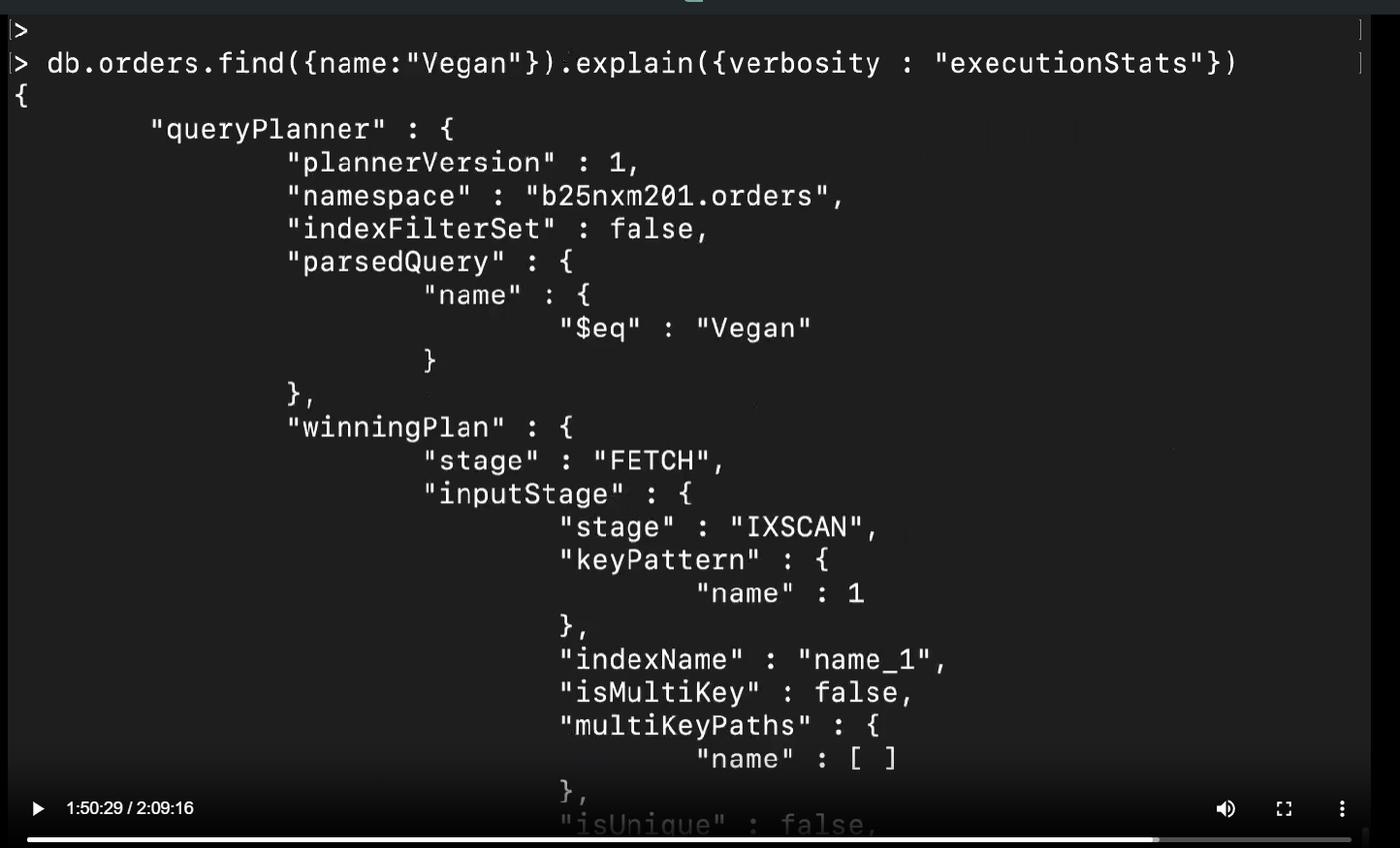
RESEARCH ABOUT COMPOUND INDEXING, mongo db winning [https://www.mongodb.com/docs/manual/applications/indexes/]
About the author
A full stack developer from India.
Html | Css | Javascript | React | Redux | Tailwind | Node | Express | Mongodb | Sql | Nosql | Socket.io
Comments
Join the discussionNo comments yet. Be the first to comment.